




A government job notification can look like a wall of tables, clauses and annexures. The trick is not to read faster; it is to connect the exact post you want with the rules that apply to that post. A single recruitment PDF may contain several post codes, different qualifications, multiple important dates and instructions that appear many pages after the vacancy table.
This guide gives you a repeatable way to read an official Indian government recruitment notice, build a one-page record and identify questions to resolve before applying. A closed 2026 SSC recruitment provides a dated example; the latest notice for your own post always controls.
To read a government job notification, first confirm that the PDF comes from the recruiting authority and note its advertisement number. Find your exact post or post code, then read its essential qualification, age and category conditions together with every referenced footnote and annexure. Record the application closing date and time separately from fee, correction and eligibility cut-off dates. Check the selection process, application instructions and any corrigendum on the official website before deciding whether to apply. Keep the page or clause number beside each requirement so you can verify it again.
- Match the post first: a condition for one post code may not apply to another post in the same PDF.
- Keep dates separate: application closure, fee payment, age reckoning and qualification cut-offs may differ.
- Read references: footnotes, annexures and prescribed certificate formats are part of the instructions.
- Check later notices: a corrigendum or addendum may change only certain clauses; do not assume everything changed.
- Trust the official source: calculators and job summaries help you prepare, but the recruiting authority decides eligibility and acceptance.
1. Find the original notification and confirm its identity
Start on the recruiting authority's own website—not a forwarded PDF or an unfamiliar payment link. Open the page where the authority lists advertisements, examinations or recruitment updates, then locate the notice using its advertisement number, examination name and publication date. Confirm that the document covers the correct recruitment cycle and not a previous year's notice.
Write down the official PDF address, recruiting organization, advertisement number and relevant post title. If you arrived from a Regal Naukri vacancy summary, compare the summary with the full official document: a job card may not include every footnote, restriction or later change. Keep the official URL and section number beside every important claim.
- ☐ Official recruiting authority and website match.
- ☐ Examination or recruitment name and advertisement number match.
- ☐ Publication date and recruitment cycle are correct.
- ☐ The site has no newer corrigendum, addendum or cancellation for this notice.
Official websites sometimes display both a short advertisement and a detailed notification. If a short notice says detailed eligibility or instructions will follow, wait for or locate the complete official notice before treating a summary as the final rule.
2. Read the vacancy table for your exact post
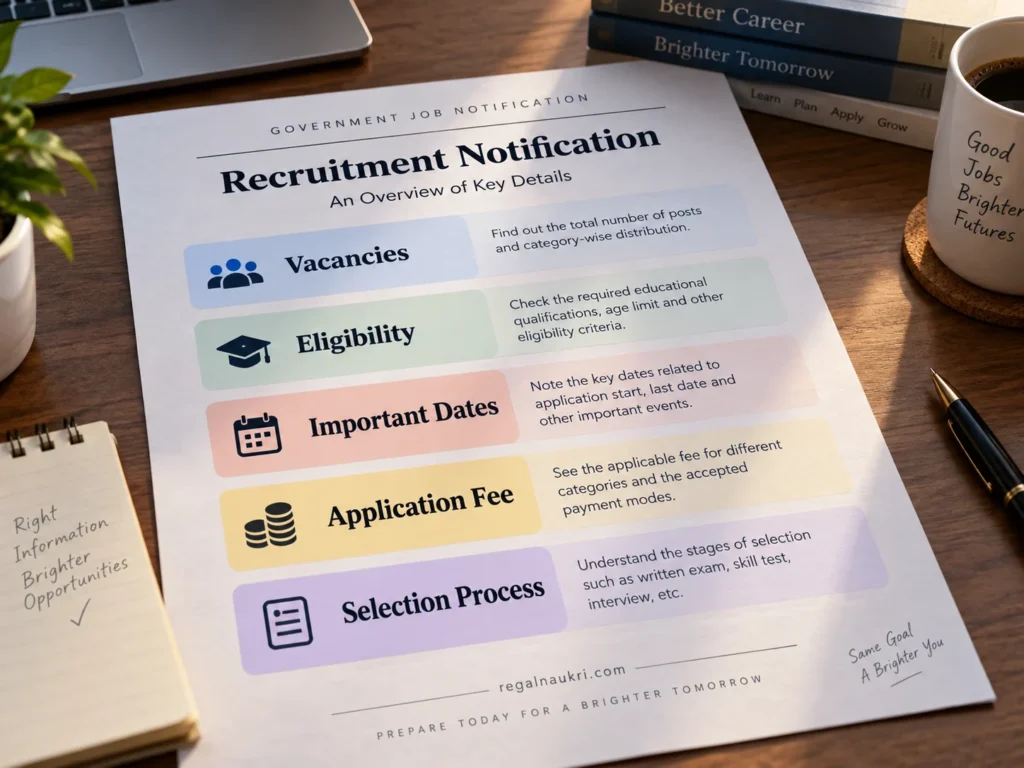
Find the table listing posts, departments, post codes, pay levels and vacancies. A large total vacancy number may cover several jobs. Identify the row that corresponds to your intended post, and follow any notes that qualify that row. Where a recruitment includes several post codes, repeat this check for each post you are considering instead of applying one code’s conditions to the entire advertisement.
| Field in the notice | What to record | Why it matters |
|---|---|---|
| Post title and code | Exact name and code | Links the right qualifications and preferences to your application. |
| Department or service | Recruiting or user organization | Can affect duties, location or post-specific conditions. |
| Vacancy information | Total and relevant category or post-wise figure | A total is not automatically your category's available vacancies. |
| Pay level | Stated level or pay scale | Describes pay structure, not guaranteed take-home salary. |
| Footnotes | Note number and full wording | May qualify vacancies, suitability or post requirements. |
Vacancy figures may be described as tentative or provisional. Read whether the authority intends to publish updated vacancy information later. Do not infer that a specific category is eligible for a particular post solely from an overall reservation table.
3. Separate essential qualifications from desirable ones
Find the educational-qualification section and read the entry that covers your post code. Check the degree or certificate, subjects, recognition, minimum marks, experience, professional registration and qualification cut-off date, wherever specified. A higher degree does not automatically replace a specifically required subject, qualification or registration. If the notice prescribes minimum marks, work out the correct aggregate with the Percentage Calculator. If it accepts a CGPA conversion, use the CGPA to Percentage Calculator only with the conversion rule permitted by your institution and the recruiter.
| Wording you may encounter | How to interpret it safely |
|---|---|
| Essential qualification | A required condition for the post; check the complete clause. |
| Desirable qualification | A preferred attribute; check whether it affects shortlisting or assessment. |
| Equivalent qualification | Use only the equivalence accepted by the notification or competent authority. |
| Experience after qualification | Check whether work done before obtaining the stated qualification counts. |
| Result declared by cut-off date | Check the notice's evidence rule; merely waiting for results may not suffice. |
Historical official example — SSC Combined Hindi Translators Examination 2026: the notice distinguishes post codes A–C from other codes and gives an essential educational qualification date of 1 August 2026. It says candidates must possess the qualification on that date and sets out how proof of the result date is assessed. This is an example of how to read a clause, not an eligibility rule for other recruitments. See sections 1 and 7 in the SSC's official 2026 notice.
Do not assume that final-year students may apply, that any institution's CGPA conversion is acceptable, or that a subject can be substituted. Look for explicit permission in the current, post-specific notification and its amendments.
4. Decode age limits, date-of-birth ranges and relaxation
Find the age section and record the date on which age is measured. It may be described as the crucial date, reckoning date or age cut-off date. This can be different from the application closing date. If the notice prints an exact acceptable date-of-birth range, compare your date of birth with that range rather than approximating from whole years.
For any category benefit, read the eligibility, certificate and combination rules for your particular post. A published category-specific DOB range may already incorporate the applicable treatment; do not add the same relaxation again in a calculator.
To calculate your completed age on the notice’s age-reckoning date, use the Age Calculator. Compare the result with any exact permitted date-of-birth range and post-specific rules in the notification. The calculator does not determine official eligibility or apply category relaxation for you.
5. Put every important date on a separate line

“Last date” is not one universal date. The accompanying visual uses illustrative, fictional dates, not dates for the SSC example below or for any open recruitment. Some notifications separately specify application opening, form submission, fee payment, correction, age reckoning, educational qualification, exam dates or document submission. Copy the event, date, exact time if supplied, and applicable post or category into your own record. If the source omits an exact closing time, do not invent midnight or 11:59 p.m.
- Application opens: when the authority starts accepting applications.
- Application closes: the latest stated time for submitting the application.
- Fee payment closes: a separate deadline, if the notice gives one.
- Correction window: only if officially announced; allowable edits may be limited.
- Eligibility cut-off: when age, qualification or another condition is measured; check each rule separately.
- Exam and later stages: dates may be tentative or announced subsequently.
Historical example, not an open application: The SSC Combined Hindi Translators Examination 2026 notice printed 14 May 2026, 23:00 as the application deadline and 15 May 2026, 23:00 for fee payment; its age-reckoning and essential-qualification date was 1 August 2026. These are three different events, not contradictory dates. The windows are now past; always consult the current notice for a live recruitment.
Another historical illustration: UPSC’s Civil Services (Preliminary) Examination 2026 notice page states a closing time of 6:00 p.m. on 27 February 2026. Do not assume an application stays open until midnight or reuse this closed examination’s time for another recruitment.
Enter the current official closing date in the Application Deadline Calculator. Supply an exact time only when the authority states it and you have confirmed the time zone. Your personal target is not an extension of the official deadline.
6. Read categories, reservations and certificate conditions in context
A reservation table is only one part of the category rules. If the post asks for qualifying work experience, check whether experience must be obtained after the essential qualification and which kinds of employment count. Use the Work Experience Calculator to add permitted periods without double-counting overlapping days; it cannot decide what experience the authority accepts. Read whether a benefit applies to the post, vacancy, eligibility status and category relevant to you. Check certificate format, competent issuing authority, validity or reference period, and any specific cut-off date. Some notices discuss age relaxation and reservation in different sections.
| If relevant to your application | What to verify in the official notice |
|---|---|
| Category or income-and-asset certificate | Prescribed format, date or reference period and accepted issuing authority. |
| Disability or scribe-related documents | Post suitability, required certificate and any separate annexure or procedure. |
| Experience or professional registration proof | Required duration, recognized body and when the condition must be satisfied. |
| Name or identity record | Accepted record and any prescribed evidence of a name change. |
Use the Government Job Document Checklist to track what this notice asks for; the tool's suggestions are not a universal list of mandatory uploads.
7. Check the fee, exemptions and exact application route
Read the fee table by category or applicant group; then inspect the permitted payment methods, deadline, refund rule and conditions for an application to be considered complete. A payment receipt by itself is not always proof of final submission.
Follow the application link published by the same authority. A commission may use an account, reusable registration or profile in addition to a recruitment-specific application. If offline applications, printed documents or a separate employer portal are mentioned, read those instructions instead of assuming the process is identical across authorities.
In the SSC’s 2026 Hindi Translators notice, the How to Apply section points to SSC’s registration and application instructions. The headline and fee table alone do not explain the complete process. Once you understand the notice, use our How to Apply for Government Jobs guide for the next stage: preparing and submitting an application.
8. Understand the selection stages, syllabus and pay language
Look for the recruitment’s actual stages: screening, written or computer-based tests, skill or typing tests, physical or medical requirements, interviews, document verification and final allocation, as applicable. Notice whether a test is qualifying or contributes to merit, whether negative marking applies, and whether the pattern differs by post. Do not assume that one examination stage guarantees selection.
Read salary terminology precisely. A pay level or pay-scale range describes a pay structure; it is not an offer of the exact take-home amount you would receive. Allowances, deductions, place of posting and other conditions can change the final figure.
When the notice gives a pay level and you want a planning estimate, use the Government Salary Calculator. Treat the result as illustrative, not an official pay slip or an appointment offer.
9. Find annexures, footnotes and the fine print
Return to the vacancy and eligibility tables and follow every note, appendix or annexure that they cite. These may contain certificate templates, detailed instructions, post-specific exceptions, image requirements, accessibility provisions, declarations or additional conditions. A requirement does not disappear because it is placed at the end of a PDF.
- Mark the reference. Write down the table row, footnote number or annexure cited by your chosen post.
- Open the full clause. Read the entire paragraph rather than only the sentence containing your keyword.
- Check the scope. Does it apply to all candidates, your category, your post code or only a named department?
- Record the evidence. Note the certificate, file, registration or condition required, with the source page.
- Resolve ambiguity officially. When two clauses seem inconsistent, look for a later amendment or contact the authority's published helpdesk.
10. Compare the original notice with every corrigendum
A corrigendum corrects or revises an earlier notice; an addendum adds information. Authorities may also issue extensions, revised vacancy lists, clarifications or cancellations. For example, Kendriya Vidyalaya Sangathan’s official recruitment page lists a corrigendum for Recruitment Notification No. 01/2025; use the authority’s index to locate such documents, then read their actual clauses rather than inferring changes from a headline. The title of a later PDF is not enough: match its advertisement number and see which exact clauses or posts it changes. Retain the original notice for all unaffected provisions.
| Original notice says | Later official update says | Your action |
|---|---|---|
| An application deadline is specified | The deadline is expressly revised | Record the revised date and check linked payment/correction dates separately. |
| A qualification condition applies to certain post codes | A named post's qualification is amended | Replace the original rule only for the affected post and clause. |
| A vacancy table is tentative | Revised vacancies are released | Use the latest applicable table; do not assume other eligibility rules changed. |
| No update is shown on the official index | A third-party site claims an extension | Verify directly before acting; an unofficial claim is not an amendment. |
An extension of the form-submission deadline does not automatically extend every age, education, fee or certificate cut-off. Check the exact wording of the official update. Never infer a new eligibility date solely because an application portal stays open longer.
11. Worked example: build your one-page notification record
Before applying, create an editable worksheet for one post at a time. Record the advertisement number, exact post code, official PDF link, essential qualification clause, age cut-off, permitted DOB range, category and certificate rules, application closing date and time, fee deadline, selection stages, and any revised instructions. Add the PDF page or clause beside each field. A dated screenshot can help you relocate a clause, but the latest official notice is still authoritative.
The table below shows how to extract facts from a historical official document, using the SSC Combined Hindi Translators Examination 2026 as a teaching example. It is not a current vacancy listing or advice to apply for that closed recruitment.
| Record field | What the historical SSC notice states | Where to verify |
|---|---|---|
| Recruiting authority / examination | SSC; Combined Hindi Translators Examination, 2026 | Cover page. |
| Selected post | Identify a specific code, A–D | Section 1.1 and the matching qualification clause. |
| Application closing | 14 May 2026 at 23:00 | Cover-page dates and application section. |
| Fee payment closing | 15 May 2026 at 23:00 | Cover-page dates and fee section. |
| Age reckoning | 1 August 2026 | Section 4.1. |
| Essential education as of | 1 August 2026 | Section 7 heading and clause 7.7. |
| Certificate and application details | Check applicable annexures and post-specific conditions | Sections 5–8 and annexures. |
Notice the key lesson: the date of application and the dates used to judge age and qualification are not interchangeable. We have deliberately not copied a single post's detailed degree rules or age-relaxation values into this evergreen guide, because those requirements belong to that specific recruitment.
12. Make a final decision without guessing
Before applying, you should be able to answer these questions for the exact post you want: Which official notice is current? Which clause gives your essential qualification? On what date are age and education judged? Do any category or post-specific conditions apply? When does the form actually close? Which official portal accepts it? What happens after you submit?
- ☐ I saved the official PDF URL and advertisement number.
- ☐ I matched my post code to its vacancy row and all referenced notes.
- ☐ I checked the complete essential qualification, including its cut-off date.
- ☐ I checked age on the prescribed date and any permitted DOB range.
- ☐ I verified category claims and document requirements, if applicable.
- ☐ I recorded application, fee and correction dates separately, including times where stated.
- ☐ I read the selection stages, uploads and final-submission requirements.
- ☐ I checked the authority's website for amendments and unresolved questions.
Frequently Asked Questions
Is a vacancy summary enough to decide whether I am eligible?
No. A summary can help you find a vacancy, but the official post-specific notice, its footnotes and subsequent amendments are the basis for checking eligibility.
Does the application closing date always decide my age?
No. Use the date stated for the age rule. Some notices prescribe an entirely different age-reckoning date or an exact permitted date-of-birth range.
What is the difference between a notification and a corrigendum?
The original notification announces the recruitment and its rules. A corrigendum corrects or revises specified parts of an earlier notice; read both together and apply the latest relevant wording.
Can I use a higher qualification if the notice requires a specific degree or subject?
Do not assume so. Check the essential qualification, accepted equivalence and any specific substitution rule in the official notice.
If a corrigendum extends the application date, does it extend the qualification cut-off too?
Only if the update expressly changes the relevant cut-off or the original rule makes it dependent on the revised closing date. Check its precise wording.
Does an accepted online form mean the recruiting authority has verified my eligibility?
Not necessarily. Applications can be accepted provisionally and documents or eligibility scrutinized later, as specified by the authority.
Read a government job notification as one post, one set of applicable clauses and several separately recorded dates. Match the official advertisement, trace its footnotes, compare later updates, and keep a short source-linked record. This method is more reliable than a headline, screenshot or rule borrowed from another examination. Once you have checked the official notice, continue with How to Apply for Government Jobs, or explore Applications & Exams for deadline and document-preparation tools.